
What 4,950 Claude Code Interactions Taught Me
What 4,950 Claude Code Interactions Taught Me About Building With AI
Last month, I went to sleep and woke up to a pull request. 137 files changed. 7,943 lines added or removed. 15 GitHub issues addressed. Still needed 2-3 hours of review and testing the next morning. But I didn't write any of it from scratch.
That didn't happen because Claude Code is magic. It happened because I spent a year figuring out how to actually work with it. 4,950 interactions across 10+ projects (that number comes from my Claude Code history JSON, not a rough guess). A lot of things broke along the way. What survived is what I'm sharing here.
Most Claude Code setups I see are a CLAUDE.md with some style preferences and a few permission rules. That gets you maybe 20% of what's possible.
Your CLAUDE.md isn't a config file. It's a team charter.
Six things survived 4,950 interactions. Each section ends with something you can copy into your own setup.
The Bug Investigation Protocol
Here's a pattern you've probably seen: you describe a bug to Claude, and it immediately starts rewriting code. Rewrites the whole function. Adds error handling. Refactors the surrounding logic. Turns out the problem was a missing environment variable.
Claude is fast. That's the problem. It latches onto the first plausible theory and starts fixing before it understands what's actually broken.
I spent months watching this happen before I wrote a protocol for it. Now it lives in my global CLAUDE.md, loaded into every single session across every project. Here's the exact text:
## Bug Investigation Protocol (CRITICAL)

**NEVER jump to code fixes. Investigate first.**

### 1. Investigate Before Fixing
- Don't assume the obvious fix is correct
- Gather evidence from multiple angles
- Cross-check findings before proposing solutions

### 2. Multi-Angle Investigation
- Single path to diagnosis -> investigate more angles
- Multiple paths confirm same diagnosis -> higher confidence, proceed
- Investigation angles: logs, database, API calls, code, config, schema

### 3. Error Messages Can Lie
- Errors pass through multiple layers (DB -> API -> Service -> UI)
- Each layer may filter/transform errors for UX
- Example: "Permission denied" may not be a permissions issue
- Always trace errors to their source

### 4. When to Confirm with User
- **Single theory only** -> CONFIRM with user before fixing
- **Multiple theories converge** -> proceed with confidence
- Cross-checking = validation, not doubt

### 5. Code Fix vs Data/Config Fix
- Before writing code workarounds, ask: Is this a code problem or data/config problem?
- Code workarounds can mask real issues
- Fixing root cause > working around symptoms

### 6. Autonomous Execution
- When diagnosis is clear -> just fix it
- Point at logs/errors/tests -> resolve without hand-holding
- Zero context switching from user
The rule that saves the most time: "Single theory only -> CONFIRM with user before fixing. Multiple theories converge -> proceed with confidence." It's a simple decision gate. If Claude can only think of one explanation, it should stop and check with me. If three different investigation angles point to the same root cause, go ahead and fix it.
The other big one: "Is this a code problem or data/config problem?" I've watched Claude write elaborate code workarounds for what turned out to be a wrong value in a database, or a missing config key. The workaround works, but now you've got code masking a data issue. That's worse than the original bug.
A real example: I was debugging a React2Shell security vulnerability in a Next.js app. The error message pointed to a rendering issue. Claude's first instinct was to refactor the component. But the protocol forced it to investigate from multiple angles: the error logs, the request payload, the middleware chain. Turned out the actual problem was unsanitized user input reaching a server-side eval. A rendering fix would have done nothing. The multi-angle investigation caught a security hole that the error message completely obscured.
Steal this: Copy the block above. Paste it into your CLAUDE.md. It works as-is.
Project-Aware Agents: Know Your Users
Most people configure Claude Code to understand their codebase. File structure, naming conventions, tech stack. That's necessary, but it's only half the picture.
Almost nobody configures Claude Code to understand their users.
I build EcoMitram, an app for environmental awareness in rural India. The people using it are farmers, students, local administrators. They're on budget Android phones with spotty 3G connections. They speak Hindi and Gujarati. Some are using a smartphone app for the first time.
If Claude doesn't know any of this, it makes bad suggestions. It proposes hover tooltips (no hover on mobile). It adds animations that choke on slow connections. It writes error messages like "Session expired, please re-authenticate" to someone using a smartphone for the first time.
So I built review agents that encode the user's reality:
mobile-reviewer targets the Pixel 7 viewport (412x915), enforces 44px minimum touch targets, and flags anything that assumes fast connections. If a component would break on 3G, this agent catches it.
ux-reviewer understands the context. Rural India. Hindi and Gujarati speakers. Users with varying digital literacy. It evaluates cognitive load and flags flows that assume familiarity with common UI patterns that aren't common everywhere.
content-reviewer checks microcopy for clarity, verifies translation completeness, reviews empty states and error messages. If an error message assumes the user knows what "authentication" means, this agent flags it.
Here's what changed after I set these up: Claude suggested a hover tooltip for a help icon. The mobile-reviewer flagged it immediately. "Hover doesn't exist on touch devices. Suggest long-press or inline hint instead." That's the kind of thing I'd catch in testing, three weeks later, after it already shipped.
Your product has different constraints. Maybe your users are on legacy IE, or depend on screen readers, or work behind strict enterprise firewalls. The idea is the same: put the user's reality into the agent prompt so reviews catch what actually matters.
Steal this: An agent prompt template you can fill in for your product:
# [Product]-Reviewer Agent

## Target User Profile
- **Primary device:** [device, viewport size]
- **Connection:** [speed/reliability]
- **Language:** [primary/secondary languages]
- **Accessibility needs:** [specifics]
- **Domain expertise:** [what they know/don't know]

## Review Checklist
- [ ] All touch targets meet minimum size for target device
- [ ] Works on target connection speed
- [ ] Copy is clear for target language/literacy level
- [ ] No patterns that assume expertise user doesn't have
- [ ] Error messages are actionable for this audience
Skills: Turning Repeated Workflows Into Commands
Any workflow you repeat three or more times should become a skill. A skill is just a markdown file that Claude Code loads when you invoke it. Instead of explaining the same process every time, you type /write-blog and Claude follows a structured pipeline.
My write-blog skill triggers five steps: competitive analysis (search for existing posts on the topic), gap discovery (what's missing), outline with an approval gate (I review before it writes), draft with humanization (strips AI writing patterns), and SEO validation (title length, meta description, image alt text).
I use a humanizer skill (based on Siqi Chen's original) after realizing 7 of my own blog posts in one sitting sounded like they were written by a press release generator. Too many em dashes. Every paragraph started with "Furthermore." The humanizer catches that stuff: inflated language, AI vocabulary, the thing where every list has exactly three items. It strips the polish and leaves the actual voice.
Other skills I use: brainstorm (asks me one question at a time instead of dumping a plan), commit (stages changes, follows the repo's commit conventions), nightshift and quality-loop (both covered below). Stuff that used to live in my head, now lives in markdown files.
Steal this: The file structure and a starter template:
~/.claude/skills/my-skill/
  SKILL.md          # The prompt/instructions
  AGENT-*.md        # Optional subagent prompts
---
name: my-workflow
description: One-line description of what this skill does
---

# My Workflow Skill

## When to Use
[Trigger conditions - when should Claude invoke this?]

## Steps

### Step 1: [Name]
[Instructions for this step]
- What to check
- What to produce

### Step 2: [Name]
[Instructions for this step]

## Subagents (optional)
If a step needs independent work, dispatch a subagent:
- **Agent name:** [purpose]
- **Input:** [what it receives]
- **Output:** [what it returns]
Drop that into ~/.claude/skills/ and you've got a working skill. Start with whatever you do most often. Or grab a ready-made one from my skills repo — ship (end-to-end issue-to-PR), test-stories (AI-driven user story testing), and plan-exit-review (challenge your plan before building) are good starting points.
Quality Loop: Competing Investigators
Before I built this, debugging with AI was a coin flip. Claude would latch onto the first theory and tunnel-vision on it. Frontend bug? It rewrites the React component. Spends 20 minutes refactoring. Turns out the real issue was a missing field in the API response.
The fix was simple in concept: don't trust one perspective.
For each bug, I spawn two investigators in parallel. A frontend investigator traces from the React component down through props, styles, and network requests. A backend investigator traces from the API endpoint through the database query, DTO, and middleware. They work independently and don't see each other's findings.
Each investigator gathers at least three pieces of evidence and proposes a root cause. Then a diagnosis validator compares the two:
for each bug:
  investigator_a = spawn("frontend", bug_context)  # component -> props -> network
  investigator_b = spawn("backend", bug_context)    # API -> DB -> middleware

  if a.root_cause == b.root_cause:
    confidence = "high"  # both paths agree, proceed to fix
  elif a.evidence_count > b.evidence_count:
    use a.root_cause  # stronger evidence wins, proceed with caution
  else:
    skip  # neither is convincing, create issue for human review
If both investigators independently point to the same root cause, confidence is high. If they disagree, the one with more evidence wins. And if neither is convincing, the system doesn't force a fix. It creates a GitHub issue for me to look at later. That last case matters. "I don't know" is a valid answer.
One thing that bit me early: retry loops. A reviewer would reject a fix. The system would retry with the same approach. Same rejection. Same retry. Infinite loop. Now there's anti-loop detection. If reviewer feedback is identical to the previous rejection, the system stops retrying and convenes an expert panel instead. Three agents each propose a different approach, majority wins. If all three have low confidence, it picks the most conservative option.
Context budget management matters here. I cap it at 3 issues per iteration, 3 iterations per session. That's roughly 30 subagent dispatches per iteration. Without those caps, a single debugging session could burn through your entire context budget on one story.
Steal this: The competing-investigators idea. You don't need my full quality-loop setup. Just spawn two agents with different perspectives on the same bug and compare what they find. The disagreements tell you more than the agreements.
Nightshift: Autonomous Overnight Development
137 files changed. 7,943 lines. 15 GitHub issues addressed. 2-3 hours of review the next morning.
That was a real nightshift run on EcoMitram. I kicked it off before bed with /nightshift:run, and by morning there was a single PR waiting for review.
The architectural decision that makes nightshift work is what I call the thin orchestrator. The main Claude Code session never reads code. Never runs tests. Never writes a single file. All it does is dispatch subagents, read their one-line summaries, and decide what happens next.
Worker summaries look like this: ORCHESTRATOR_SUMMARY: Added avatar component, tests pass, no lint errors. Reviewer verdicts: VERDICT: APPROVE or VERDICT: REJECT: missing edge case test. That's it. The full output lives in artifact files that the orchestrator never opens.
This is why it can process 15 issues in one session without running out of context. The orchestrator's context stays small because it only ever sees summaries.
Each issue runs through a 7-step pipeline:
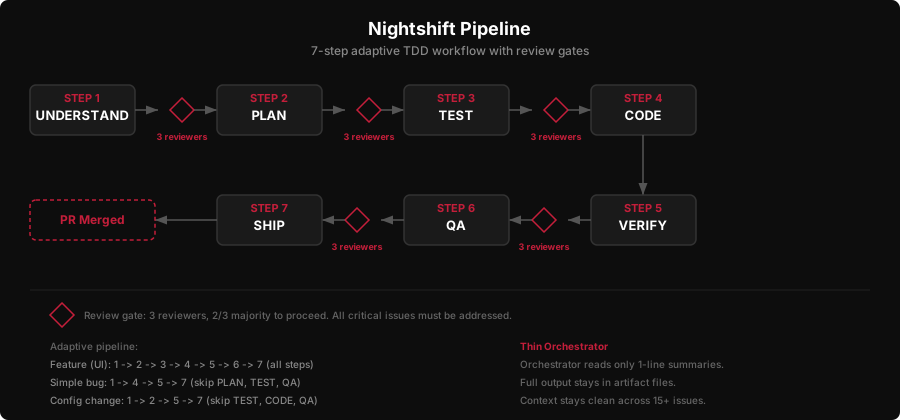
- UNDERSTAND - read the issue, explore the codebase, classify the issue type
- PLAN - implementation plan with test strategy
- TEST - write failing tests first (TDD red phase)
- CODE - write code to make tests pass (TDD green phase)
- VERIFY - run all tests, lint, typecheck, build
- QA - browser testing for UI changes
- SHIP - create PR, merge when checks pass
Not every issue needs all seven steps. Simple bugs skip PLAN and TEST. Config changes skip TEST and CODE. The pipeline adapts based on how UNDERSTAND classifies the issue.
After each step, three reviewer subagents evaluate the work. Two out of three need to approve before moving on. But here's the override that took me a while to figure out: all critical issues from any reviewer must be addressed, even from the minority. If one reviewer out of three flags a crash risk, you can't just outvote it. Critical means critical. Minor stuff (naming, style preferences) follows the majority.
Sometimes the system gets genuinely stuck. Ambiguous requirements, conflicting feedback, reviewers split three ways. When that happens, it convenes an expert panel: three agents each propose a different approach, majority wins. If all three have low confidence, it picks the safest option. Every decision gets logged as a comment on the GitHub issue, so there's always a trail.
The branch strategy keeps main safe. Nightshift creates a buffer branch (nightshift/2026-03-21-feature-slug). Each issue gets its own branch off that. PRs merge into the nightshift branch, not main. In the morning, one final PR: nightshift branch into main. I review once, merge once. If something looks wrong, I can reject the whole batch without main ever being touched.
Honest numbers: I've been running nightshift for about a month. None of the runs have produced a fully clean PR that I could merge without changes. Context drifts over long runs, and the output always needs human review and testing. Reviewing the morning PR takes 2-3 hours, including manual testing. That's not "zero effort overnight magic." It's more like having a junior developer who works all night and hands you a draft in the morning. You still review everything. But you're reviewing and fixing, not writing from scratch. That's the real value.
The path to truly clean PRs is better evaluation frameworks. Nightshift's review gates catch a lot, but they can't catch everything that a human would notice. I'm working on it. The system is useful today.
If you're wondering about cost: I'm on the Claude subscription, so I don't have per-run API costs to share. If you're on API billing, expect 15 issues through a 7-step pipeline with 3 reviewers per step to add up. Budget accordingly.
Steal this: The thin orchestrator pattern. This is essentially the supervisor/worker pattern from distributed systems, applied to Claude Code subagents. Even if you never build anything like nightshift, this principle applies to any multi-agent workflow:
# The orchestrator NEVER:
#   - reads/writes code
#   - runs tests or builds
#   - explores the codebase
#
# The orchestrator ONLY:
#   - dispatches subagents
#   - reads 1-line summaries
#   - makes proceed/retry/block decisions

for each issue:
  for each step in adaptive_pipeline(issue.type):
    worker = dispatch(step, issue_context)
    summary = worker.one_line_summary  # max 20 words

    reviewers = dispatch_parallel(3, step + "_review", worker.artifacts)
    verdicts = [r.one_line_verdict for r in reviewers]

    if majority(verdicts) == APPROVE and no_critical_issues(reviewers):
      next_step()
    elif retries < max_retries[step]:
      retry_with_feedback(reviewers.critical_issues)
    else:
      block(issue, reason=reviewers.summary)
Keep the orchestrator thin. Let it decide, not do.
Wormhole: Claude Code Without VS Code
I don't use VS Code for Claude Code anymore. I work from a browser.
That sounds weird, so here's what it actually looks like:
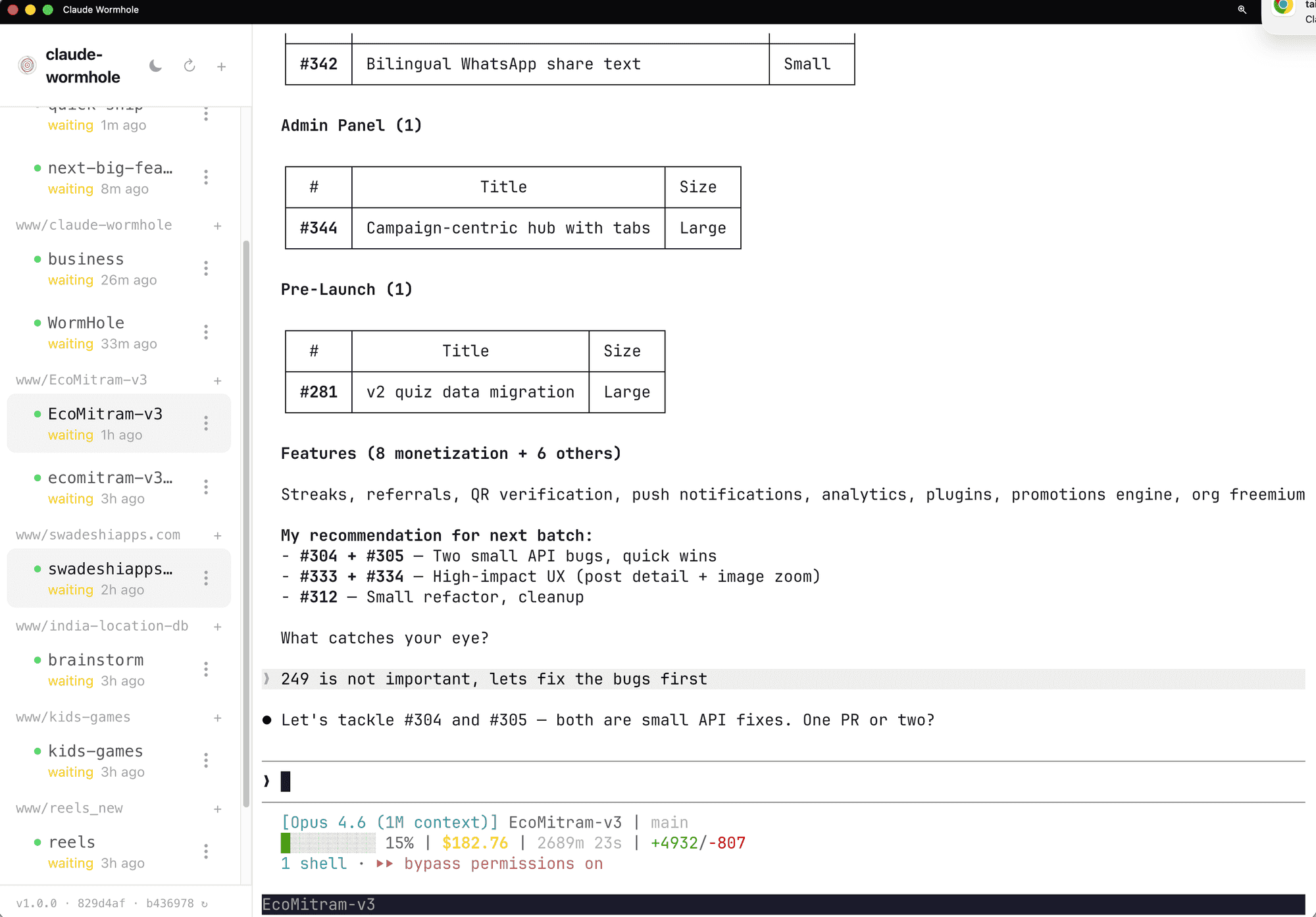
Claude-wormhole gives me a browser UI with a session sidebar. Multiple projects, each with its own Claude Code session. I can see which ones are waiting for input, which are idle, how long they've been sitting there. The EcoMitram session is mid-conversation about issue prioritization. The kids-games session has been waiting for 2 hours. The reels project just got picked back up.
Switching between projects is a click. Not "which VS Code window was that?" Not hunting through terminal tabs. Click the project, see the session, pick up where I left off.
Creating new sessions is just as fast. I want to start working on a new project, I click the plus icon, pick the directory, and I'm in a Claude Code session. No "open folder in VS Code, open terminal, type claude."
But the real shift is cross-device. The same interface works from my phone. Nightshift runs overnight, and I check the morning report from bed. A quality loop finishes while I'm out, and I review the results from my phone. I've approved PRs from a coffee shop.
Before wormhole, I had four VS Code windows open. Each with its own terminal running Claude Code. Alt-tabbing between them. Losing track of which project was in which window. Couldn't check anything from my phone.
Now it's one browser tab. Session sidebar. Switch projects in a click.
It ties into the rest of the setup through hooks. In my settings.json:
{
  "hooks": {
    "Notification": [
      {
        "matcher": "*",
        "hooks": [
          {
            "type": "command",
            "command": "/path/to/wormhole notify",
            "timeout": 10
          }
        ]
      }
    ],
    "Stop": [
      {
        "hooks": [
          {
            "type": "command",
            "command": "/path/to/wormhole notify",
            "timeout": 10
          }
        ]
      }
    ]
  }
}
When any Claude Code session completes a task or stops, wormhole sends a notification. My phone buzzes. I glance at the session, see the result, move on.
Once nightshift handles issues overnight and quality loop handles debugging, you stop needing a full IDE. You need a command center. That's what wormhole became for me.
Steal this: The hook config above. You don't need wormhole specifically. The point is that Claude Code hooks can trigger anything when a session finishes: a Slack message, a desktop notification, a script that runs your test suite. Check the wormhole post if you want the full cross-device setup.
The Evolution and What I'd Do Differently
None of this existed a year ago. Here's roughly how it built up.
Around 500 interactions, I had a basic CLAUDE.md with coding style preferences and a few rules about file naming. Claude was a fast autocomplete. Useful, but I was doing all the thinking.
Around 2,500 interactions, things started compounding. I wrote the bug investigation protocol after watching Claude rewrite an entire authentication flow when the actual problem was a wrong value in the database. I built the first EcoMitram review agents after Claude kept suggesting hover interactions for a mobile-only app. I made the write-blog skill after manually explaining the same content workflow for the fifth time. Each one solved a specific annoyance. Together they started feeling like a system.
By 4,950, the pieces connected. Nightshift uses the review agents. The quality loop uses the competing-investigators pattern. The bug protocol shapes how every agent investigates problems. Wormhole ties it all together from the browser. I didn't plan this architecture. It grew from fixing one problem at a time.
What I over-engineered
Early review agents were too granular. I had separate agents for checking button sizes, checking font sizes, checking spacing, checking color contrast. Four agents doing what one mobile-reviewer agent does now. The overhead of dispatching and synthesizing four reviews wasn't worth the marginal improvement in coverage. One agent with a good checklist beats four agents with narrow scopes.
I also tried running nightshift without the thin orchestrator pattern at first. One big agent doing everything: reading issues, writing code, running tests, reviewing its own work. It worked for 2-3 issues, then ran out of context. The thin orchestrator wasn't clever architecture. It was the obvious fix after watching the monolithic approach fail repeatedly.
The lessons.md file got over-engineered too. I had it tracking every minor correction across every project. "Used /app/ prefix after user said not to." "Suggested Puppeteer when Cheerio was enough." Useful for the first month, but it grew to a point where loading it was wasting context on trivial stuff. I pruned it down to patterns that actually recur across projects, not one-off corrections.
What's still rough
Context budget management is trial and error. The caps in quality loop (3 issues per iteration, 3 iterations per session) came from watching it blow through context a few times. I don't have a principled way to predict how much context a given task will consume. The caps work, but they're guesses that happened to land in the right range.
Expert panels sometimes produce conservative non-answers. Three agents, all uncertain, all picking the safest option. The system interprets that as consensus when it's actually three agents saying "I don't know" in slightly different ways. This isn't just a rough edge. It's a fundamental limitation: these agents all share the same training data, so their "independent" opinions aren't truly independent. I haven't solved this. For now, those cases get flagged as blocked and I handle them manually.
What broke
Early nightshift run on EcoMitram. The system processed 8 issues overnight. Looked great in the morning report: all tests passing, all PRs merged to the nightshift branch. I merged the final PR to main. Deployed. Half the pages had broken layouts. What happened: the review agents at that point didn't have the mobile-reviewer with viewport constraints. Code that passed all tests was technically correct but visually wrong on the actual target devices. Tests passed. Lint passed. Build passed. The app looked terrible on a Pixel 7. That's when I built the project-aware review agents.
If you're starting today
Don't try to build all of this at once. Here's the order I'd recommend:
- Day 1: Bug investigation protocol in your CLAUDE.md. Zero setup cost, immediate difference.
- Week 1: One project-aware review agent. Pick your product's most important user constraint and encode it.
- Week 2: One skill for your most repeated workflow. Whatever you explain to Claude more than twice.
- Month 1: Try the competing-investigators pattern next time you hit a hard bug. See if dual perspectives help.
- When you trust the foundation: Nightshift. Don't let AI run unsupervised until you trust the review gates to catch what matters.
Each layer depends on the ones below it. Nightshift without good review agents is how you get broken layouts in production at 3am.
Your CLAUDE.md Is a Team Charter
People ask why Claude Code instead of Cursor or Windsurf or Copilot. For me it's simple: I want to move away from code. Being inside an editor is a mental block. It keeps me thinking about syntax and implementation when I should be thinking about the product and the users. Claude Code lets me describe what I want and stay at that level. The setup I've described here is how I got there.
This took a year to build up. You don't need all of it. You probably don't need most of it.
If you take one thing from this post, make it the bug investigation protocol. Paste it into your CLAUDE.md. Use it for a week. See what changes.
After that, pick whichever sounds useful: a review agent that knows your users, or a skill for your most repeated workflow. One at a time.
Everything in this post is copy-paste ready. The protocol, the agent template, the skill structure, the orchestrator pseudocode, the hook config. All of it. The skills mentioned here are open source at github.com/ssv445/claude-skills — grab individual skills like nightshift, quality-loop, write-blog, humanizer, brainstorm, or clone the whole repo.
What does your setup look like? I'm curious what other people have landed on after heavy use. If you've got a pattern that works, I'd like to hear about it.