
I Built claude-wormhole 3 Weeks Ago. Last Night Anthropic Shipped the Same Idea.
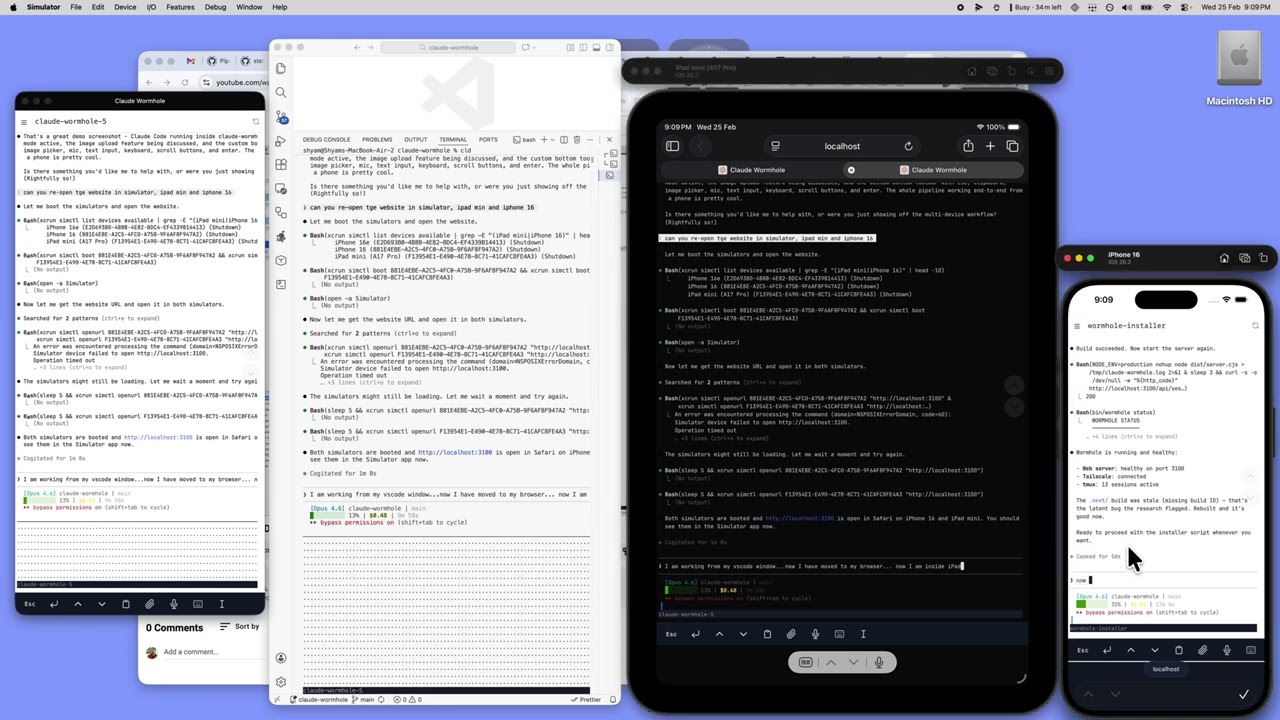
Here's it in action. Same Claude Code session, synced across VS Code, browser, iPad, and iPhone. Even the prompt stays in sync:
I built claude-wormhole about 3 weeks ago. Last night, Anthropic released Remote Control, which does basically the same thing. This is the story of how I got here, and how the two compare.
It started with OpenClaw
I kept seeing projects like OpenClaw. AI agents on a VPS, available 24x7 through Telegram. Assign tasks, check progress, get results. Cool concept. So I tried building my own version. 6 agents on a Hetzner box: coordinator, analyst, developer, writer, designer, reviewer.
It went badly.
API costs were unpredictable because nobody was watching what the agents spent. I got SSH brute-force attempts within hours of spinning up the VPS. Found tokens sitting in readable config files. I set the whole thing up twice before admitting it wasn't working. More time on infrastructure than on anything useful.
And then I thought, wait. I don't want agents running on some VPS. I want my own Mac, my own files, my own dev environment. I just want to reach it from my phone.
6 months of the same annoyance
This had been bugging me for about 6 months. Every time I used Claude Code, the same thing happened. Start a task, step away, come back and Claude is frozen on a permission prompt. A single "y" was all it needed. That one-second approval cost me 15 minutes of dead time.
Or I'd close my laptop, take it to a meeting, and the terminal session would be gone. Context, conversation, everything.
I just wanted to check my phone, tap approve, maybe tell Claude to look at something else, put the phone down. From the couch. From wherever. Without spinning up a VPS or configuring cloud infrastructure.
Things that didn't work
My first attempt was VS Code Tunnel with a mobile profile. Built a custom VS Code extension for tmux session management. Then I discovered that many extensions don't work in browser mode because they need a Node.js runtime the web client doesn't have. Dead on arrival for mobile. And VS Code's web UI on a phone screen is painful. Too many panels, too many menus.
Next: webmux, an open-source web-based tmux client. Needed the entire Rust toolchain to build. Broken node_modules out of the box. When I finally got it running, it couldn't detect my existing tmux sessions. More time fighting the tool than it would have taken to build something simpler.
I looked at what others were doing too. Harper Reed wrote about using SSH + Blink + Mosh + tmux, which works but means configuring each piece yourself. Happy Coder takes a different approach with an encrypted relay server. 247-claude-code-remote uses Next.js + Cloudflare Tunnel + Turborepo, which felt like a lot of machinery for what's basically "show a terminal in a browser."
The official Claude Code on the web runs in a cloud sandbox. It can access your GitHub repos and connect to tools via MCP, but it doesn't touch your local machine, local databases, or custom dev environment.
None of these were what I wanted: something minimal, on my Mac, no cloud dependency.
So I built claude-wormhole
Three pieces, each doing one thing.
tmux keeps sessions alive. Close the terminal, sleep the laptop, reboot the machine. Doesn't matter. With resurrect + continuum, sessions auto-save every 15 minutes and come back after restarts.
A web terminal (Next.js + xterm.js) connects to tmux over WebSocket. node-pty spawns tmux attach and pipes I/O to the browser. Install it as a PWA on your phone: full screen, no browser chrome.
Tailscale handles networking. Phone and Mac on a private network. Nothing on the public internet. HTTPS via tailscale serve with automatic certs.
Phone (Safari PWA)  ──┐
Browser             ──┤                ┌──────────────────────────┐
VS Code terminal    ──┼── Tailscale ──>│  Mac / tmux              │
iPad                ──┤   private net  │   ├─ my-app (claude)     │
SSH (Terminus)      ──┘                │   ├─ api (claude)        │
                                       │   └─ scripts (bash)      │
                                       └──────────────────────────┘
Each layer is independent. You can swap parts too: ngrok instead of Tailscale, or SSH straight into tmux instead of the web UI. Nothing is coupled.
The virtual keyboard problem
This is where I spent the most time. Phone keyboards can't send Ctrl+C, Ctrl+G, Escape, or any of the control sequences Claude Code needs constantly. It took three tries.
First attempt: a floating draggable keyboard. Annoying. Second: 42 Claude Code shortcut buttons. Right keys, wrong UX. Final version: a fixed bar at the bottom, terminal shrinks to make room. You fumble with it for a day, then it becomes muscle memory.
Push notifications
Claude Code hooks fire when Claude finishes a task or needs input. The wormhole server picks these up and sends push notifications to your phone. Phone buzzes, you tap "y", phone goes back in your pocket. Even when the PWA isn't open.
Setting it up
The whole thing takes about 15 minutes.
brew install tmux node
brew install --cask tailscale
npm install -g @anthropic-ai/claude-code
git clone https://github.com/tmux-plugins/tpm ~/.tmux/plugins/tpm
git clone https://github.com/ssv445/claude-wormhole.git
cd claude-wormhole
./install.sh
The install script handles prerequisites check, build, CLI symlink, tmux config, Claude Code notification hooks, and Tailscale setup.
One thing that will save you time with Tailscale: on your Mac, open the menu bar icon, go to Settings, and turn on "Allow incoming connections." Do this first. I lost 2 hours debugging connectivity once. Went deep into macOS firewall config, pfctl rules, packet filter anchors. None of that mattered. It was this one toggle in Tailscale's own preferences.
After install:
cd ~/projects/my-app
wormhole cld               # launches Claude Code in a tmux session
If sessions for that project already exist, cld lists them so you can pick one or create a new one.
For the phone, open Safari, go to your Tailscale URL (https://your-mac.tailnet.ts.net), tap Share > Add to Home Screen. Safari's browser chrome disappears in PWA mode. Feels native.
Want it to auto-start on login? wormhole service install sets up a launchd agent with crash recovery. The setup guide covers push notifications and everything else.
What a typical day looks like
Start a task on my laptop. wormhole cld from the project directory. Claude starts working. I walk away.
On my phone later, I open the PWA. Claude is waiting for permission to modify 12 files. I tap "y". Claude continues. Phone goes back in my pocket.
I get a push notification 20 minutes later. Claude finished.
Next morning, same tmux session on my laptop. Full conversation, every file it touched. Review it, push the changes, move on. One session the whole time. Never re-explained anything.
Then Anthropic released Remote Control
Last night, Anthropic shipped Remote Control. You run claude remote-control in your terminal, and it registers with the Anthropic API. You connect from claude.ai/code or the Claude app on iOS/Android. Messages route through Anthropic's servers. Your local environment stays local.
One command, native app support, and a QR code to pair your phone.
Different tradeoffs though.
Session persistence
Remote Control's docs are upfront about it: "If you close the terminal or stop the claude process, the session ends." The session is the process.
With wormhole, tmux IS the session. Close the terminal, close your laptop, reboot. The tmux session is still there. tmux-resurrect saves sessions across reboots, tmux-continuum auto-saves every 15 minutes. I've rebooted my Mac and come back to everything where I left it.
Multiple sessions
Remote Control supports one remote session at a time per Claude Code instance.
I usually have 3 or 4 tmux sessions running, one per project. I switch between them from a sidebar on my phone. Start something on one project, check on another, come back.
Plan requirements
Remote Control needs a Pro or Max plan ($20-200/mo). API keys aren't supported. If you're running Claude Code on API credits, it won't work.
Wormhole works with whatever Claude Code setup you already have. API keys, Pro plan, anything.
Where traffic goes
Remote Control routes everything through Anthropic's servers over TLS. Wormhole keeps everything on your private Tailscale network. Traffic goes between your phone and your Mac, nothing else.
Where Remote Control wins
Setup, clearly. One command vs 15 minutes of configuration. You don't have to learn tmux, create a Tailscale account, or run a server on your own machine.
Having a native mobile app is also genuinely nice. Wormhole's PWA works well, but it's still a web app. And the QR code pairing is a good touch.
If you're on a Pro plan and want this to work with zero effort, Remote Control is the obvious choice.
Tradeoffs with wormhole
Your Mac needs to be running. If it sleeps or shuts down, the web UI goes dark. This isn't a cloud dev environment.
Tailscale is required for remote access. The free tier is enough, but it's another thing to set up.
Claude itself doesn't survive Mac reboots. The tmux session comes back, but the Claude process is gone, so you'd need to start Claude again.
Why I'm keeping wormhole
I'm kind of glad Anthropic built Remote Control. Means the problem is real and not just me being weird about it. Everyone running Claude Code hits this wall eventually. Sessions tied to your terminal is a real limitation.
But I'm keeping wormhole because it does what I wanted for 6 months: sessions that survive anything, multiple projects running at once, all on my own network, working with whatever API keys or plan I already have, from any device I pick up.
It's open source: github.com/ssv445/claude-wormhole
If you've got a different setup for managing Claude Code across devices, I'd like to hear about it. I'm @ssv445 on Twitter.