
Stop Overfeeding Your CLAUDE.md

Your Claude Pro subscription hits 100% by 2pm. You stare at the 5-hour reset timer.
I kept hitting this wall. I was running out of tokens. Most of them wasted before I even typed my first question.
Five techniques took my project context from 75KB to 20KB. I haven't noticed any quality drop. I do notice I can work longer before hitting the limit. Each section has a prompt you can copy-paste.
The invisible tax you're paying
Every Claude Code conversation silently loads your CLAUDE.md, project rules, tech specs, and any files you reference with @ includes. This happens before you type a single word.
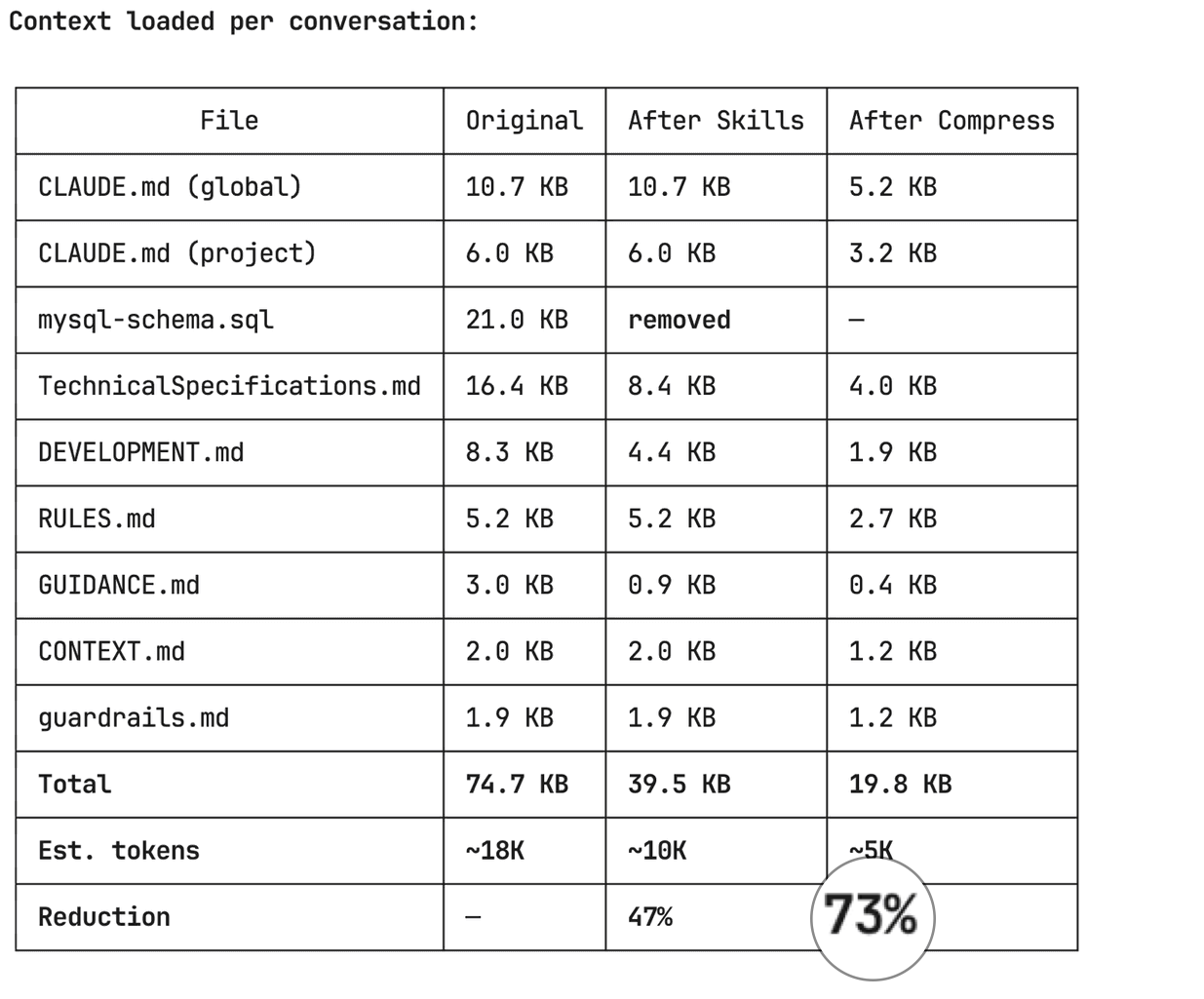
I checked mine. On my SaaS project (LinkStorm), the always-loaded context files totalled 75KB. Roughly 18,000 tokens, gone before I said hello. Like starting every taxi ride with $50 already on the meter.
Check yours. Run this in your terminal from the project root:
claude -p "List every context file loaded in this session with byte size (wc -c). Output as a table."
If you see more than 20KB total, you're probably paying for context you rarely use.
1. Kill dead weight: static files that should be live queries
I had a MySQL schema dump checked into .claude/mysql-schema.sql. 21KB. Loaded every single conversation. But I only needed it when writing migrations or touching database entities. Maybe 20% of the time.
The fix: I deleted the static file and created a Claude Code skill that queries the live database via MCP when I actually need it.
# Before: 21KB loaded every conversation
wc -c .claude/mysql-schema.sql
# 20954 bytes. Every. Single. Time.
The skill runs SHOW CREATE TABLE or queries information_schema on demand. It's always current (no stale schema files) and costs zero tokens when I'm not doing database work.
The prompt to do this yourself:
Look at all files in my .claude/ directory. Identify any static
data dumps (database schemas, API specs, config snapshots) that
could be replaced with live queries via MCP or CLI commands.

For each one:
1. How big is it?
2. What % of conversations actually need it?
3. Can we replace it with an on-demand skill that fetches
   live data?

Create the skill, update references, delete the static file.
2. Move rarely-needed docs to on-demand skills
After killing dead weight, I still had 54KB loading every conversation. I went section by section through my tech specs and asked: "Do I need this in more than half my conversations?"
Three big sections failed that test:
- UI design system (colors, component patterns, breadcrumbs) at 8.5KB, needed only during frontend work
- Git worktree guide (Docker limitations, vendor setup) at 4KB, needed only when in worktrees
- Debugging checklists (crawler stuck, opportunities not generating) at 3KB, needed only when investigating bugs
I moved each into a Claude Code skill. Skills only load when triggered. The rest of the time, they cost nothing.
# Skills are just markdown files in .claude/skills/
# with a YAML frontmatter that tells Claude when to load them

---
name: ui-patterns
description: LinkStorm UI design system, component patterns.
  Use when building or modifying frontend UI.
---

[full content here -- only loads when doing frontend work]
15KB moved from "always loaded" to "loaded when needed." That brought me from 54KB to 40KB.
The prompt:
Analyze each section of my CLAUDE.md and .claude/*.md files.
For each section, estimate what % of conversations need it.

Sections needed in <50% of conversations should become
on-demand skills in .claude/skills/.

Create the skills with clear trigger descriptions so Claude
knows when to load them. Replace the original sections with
one-line pointers like: "Use /skill-name for details on X."

Show me a before/after comparison table.
3. Compress what stays: caveman-style formatting
After skills migration, 40KB still loaded every conversation. This is the stuff that's genuinely needed most of the time: business rules, architecture overview, Docker setup, deployment config.
But it was written in verbose prose: full sentences, explanatory paragraphs, markdown headers everywhere.
These files are instructions for an AI. Claude parses terse bullets fine. Arguably better than prose, because less noise to filter through.
I compressed everything using "caveman style" (credit to Julius Brussee for the concept): drop articles (a/an/the), drop filler words, keep code paths and values exact.
Before:
### Docker Container Setup

The application runs in Docker containers via `.devcontainer/`.

#### Container Names
- **Web (PHP/Apache)**: `linkstorm-web-1`
- **Node.js API**: `linkstorm-node-1`
- **MySQL/MariaDB**: `linkstorm-mysql-1`
- **MongoDB**: `linkstorm-mongodb-1`

#### Volume Mounts
- Project root mounted at `/root/linkstorm` (inside container)
- Source code at `/var/www/html` (inside container)
- Files edited on host are immediately available in container
After:
## Docker Containers
- Web (PHP/Apache): `linkstorm-web-1`
- Node.js API: `linkstorm-node-1`
- MySQL: `linkstorm-mysql-1`
- MongoDB: `linkstorm-mongodb-1`

Mounts: project root → `/root/linkstorm`, source → `/var/www/html`
Same information, half the tokens.
This pass alone took 40KB down to 20KB. 50% reduction on the remaining files.
One caveat: watch for cases where terse instructions cause Claude to miss nuance on edge-case rules. If something gets misinterpreted, expand that specific instruction. But in months of use, I haven't had to revert a single compression.
The prompt:
Compress all my CLAUDE.md and .claude/*.md context files using
caveman-style formatting:

Rules:
- Drop articles (a/an/the), filler, hedging
- Convert prose paragraphs to terse bullet points
- Keep ALL code paths, commands, values, URLs exact
- Keep technical terms exact
- Merge redundant headers
- Use symbols: → = & w/ instead of words

Do NOT compress code blocks, commands, or credentials.

Show me a before/after size comparison for each file.
Create compressed versions in .tmp/ for review before applying.
4. Subagent-first: keep your main context clean
This one is about what accumulates during the conversation.
Every time Claude runs a grep, reads a file, executes a build, or fetches data from an MCP server, that output lands in your conversation context. A build output can easily be thousands of tokens. Explore 10 files and you've burned through context that could have been a dozen more questions.
The subagent-first pattern treats your main Claude session as a thin orchestrator. Real work happens in subagents that run in their own isolated context and return only a short summary to your main session.
I adopted a simple rule: if a task will produce more than 20 lines of output, delegate it. In practice this means builds, linting, multi-file exploration, code review, and MCP data fetches all happen in subagents. My main context stays lean for thinking through problems and talking to me.
# Add this to your CLAUDE.md to make it automatic:

## Subagent Strategy
Default: delegate. Main agent = orchestrator.
Real work = subagents.

ALWAYS delegate:
- Bash commands with >20 lines output → execute agent
- Multi-file exploration → Explore agent
- MCP calls with large payloads → mcp-fetch agent
- Code review → matching review agent
- Build/test/lint runs → execute agent

Main agent only: read known files, edit, write,
compose final answer, spawn subagents.
Your main context stays reserved for the conversation, not for storing raw grep output you'll never look at again.
5. Handoff across /clear: reset without losing continuity
Even with all the above, long conversations still accumulate context. After 30-40 messages, Claude gets slower and more expensive. Eventually you hit limits.
I use a handoff pattern for this. Three steps:
- Save -- compress your conversation state to a small file (~300-800 tokens)
- Clear -- run
/clearto reset context to zero - Resume -- load the handoff file in a fresh session and keep working
The handoff file keeps only what matters: goal, current state, decisions made, files touched, what to do next. Dead ends, raw outputs, back-and-forth -- all dropped.
# Step 1: Save state
/handoff save

# Claude compresses your conversation into a small
# handoff file (~300-800 tokens depending on complexity).
# Saved to .tmp/handoff/context-20260417-143022.md

# Step 2: Clear (manual)
/clear

# Step 3: Resume in fresh session
/handoff resume

# Claude reads the handoff file and picks up
# where you left off. Full context budget available again.
Note: /handoff is a custom Claude Code skill, not a built-in command. You can grab it along with subagent-first and caveman-distillate from my skills repo.
Use this after finishing a phase of work, or whenever the conversation feels sluggish. You get a fresh context budget with full continuity.
The full results
Here's what happened to my LinkStorm project context:
| Stage | Size | Tokens | Reduction |
|---|---|---|---|
| Original | 75KB | ~18K | -- |
| After removing dead weight | 54KB | ~13K | 28% |
| After moving to skills | 40KB | ~10K | 47% |
| After compression | 20KB | ~5K | 73% |
13,000 fewer tokens loaded before every conversation. That's context budget you get back for actual work — more questions before you hit the limit.
What's your context size?
Run this in your terminal right now:
claude -p "List every context file loaded in this session with byte size (wc -c). Output as a table."
If it's over 30KB, you're leaving conversations on the table. The prompts in each section above will get you most of the way in a single session.
Your context just needs a trim.
What's your number? Run the command and tell me on Twitter.